We use cookies to make your experience better. To comply with the new e-Privacy directive, we need to ask for your consent to set the cookies. Learn more.

vSAN ReadyNode Buying Guide: AF-4 vs AF-6 vs AF-8
Posted:
August 10, 2026
Categories:
General Topics and News
A vSAN ReadyNode is a validated configuration, so the hardware compatibility question is already answered. What is not answered is which one you should buy. AF-4, AF-6, AF-8 and HY-6 look like model names but are not; 1U and 2U are not simply a matter of rack space; and the raw terabytes on a datasheet are never the terabytes you get to use. This guide covers the decisions that actually determine the configuration, and what each one costs.
Short answer
Most production vSAN clusters should start from all-flash AF-6 or AF-8 ReadyNodes. Choose AF-6 for mixed production virtual machines, AF-8 for databases, VDI and latency-sensitive workloads, HY-6 only when cost per terabyte matters more than latency, and ESA ReadyNodes when you want an all-NVMe architecture with better efficiency and a longer service-life path.
Do not size from raw capacity. Start with the usable capacity you need, then work backwards through storage policy, failure tolerance, rebuild reserve, growth headroom, node count and network requirements.
Which vSAN ReadyNode should you start with?
| Starting point | Best fit | Where to look |
|---|---|---|
| AF-4 | Small clusters and general virtual machines | Entry all-flash nodes |
| AF-6 | Most mixed production VM environments | 1U AMD AF-6, 8 TB NVMe |
| AF-8 | VDI, databases and latency-sensitive workloads | 1U AF-8, 30.7 TB |
| HY-6 | Bulk capacity where cost per TB beats response time | 2U HY-6, 60 TB SAS |
| ESA ReadyNode | New all-NVMe designs where ESA is on the roadmap | ESA BigTwin, 2 nodes |
| SF-AF compact | Branch, shop-floor or edge deployments | Compact SF-AF, 1 TB |
| StarWind HCI | Two-node economics or a VMware licensing alternative | 2U Intel StarWind HCI node |
Not sure which vSAN ReadyNode fits?
Send us your workload, required usable capacity, failure-tolerance target, rack-space limit and preferred architecture. SERVER SIMPLY returns a validated Supermicro vSAN ReadyNode recommendation, the storage policy it supports, estimated usable capacity after overhead, and confirmed EU lead time.
Request a Supermicro vSAN ReadyNode configuration · Contact us
Why vSAN ReadyNode selection matters
A vSAN ReadyNode is validated, but that does not mean every ReadyNode is right for every cluster. The wrong choice leaves you with too little usable capacity, restricted storage policies, a network bottleneck, no path to ESA, or a growth model that forces a hardware refresh earlier than planned.
What goes wrong most often
- Raw capacity looks sufficient on the quote, but usable capacity after policy overhead is too low.
- A three-node cluster runs, but leaves no rebuild or maintenance headroom.
- 10 GbE becomes the bottleneck on an all-flash or ESA cluster.
- OSA-ready hardware is purchased even though ESA is on the roadmap.
- 1U is chosen for rack density, then there are not enough drive bays or PCIe slots to grow.
- Hybrid is chosen to lower the price, and latency becomes a production issue.
Still evaluating VMware licensing? SERVER SIMPLY can also compare vSAN ReadyNodes with StarWind-based HCI on similar Supermicro platforms before you commit to the hardware.
What the profile names actually mean
The letters describe the media. AF is all-flash: every drive is an SSD or NVMe device. HY is hybrid: an SSD cache tier in front of spinning capacity disks. SF-AF denotes the compact single-node form factor used at edge sites.
The number is a performance class, not a model or a generation. AF-4 through AF-8 describe roughly how much IOPS and capacity the profile is validated to deliver — a ladder, not a product line. Two servers with completely different chassis, CPUs and drive counts can both be AF-6 if they meet the same class.

In practice AF-6 is where most production clusters land. AF-4 suits small clusters and general virtual machines. AF-8 is for databases, VDI and anything where latency is a service-level concern rather than a preference. HY-6 survives only where cost per terabyte outranks response time.
Hybrid or all-flash
This is the first decision because it constrains every one that follows.
In a hybrid node the SSD is cache only. Reads that miss the cache go to a spinning disk, so latency depends on your working set fitting in cache. When it does, hybrid performs well. When the working set grows, performance degrades in a way that is difficult to predict and awkward to explain to the application owner.

All-flash removes that variable and unlocks the features most people actually want: deduplication, compression and erasure coding. It is also mandatory for the Express Storage Architecture. Our HY-6 node built on the SuperStorage SSG-5029P-E1CTR12L reaches 60 TB raw on SAS drives, which is still the cheapest route to bulk capacity — but for anything running production workloads, start from all-flash and justify hybrid as the exception. The underlying media trade-offs are covered in NVMe versus SATA and comparing SAS, SATA, NVMe and CXL.
ESA or OSA
The Express Storage Architecture is a different storage stack, not a licensing tier or a tuning option. ESA is a single-tier architecture optimised for NVMe flash: there is no separate cache tier, and it requires an all-NVMe configuration on a validated ESA ReadyNode. It will not run on a repurposed OSA node.
What you get in return is compression that is effectively free in performance terms, better erasure-coding efficiency, and a simpler data layout. We covered the performance side in detail in our analysis of vSAN ESA deduplication and performance, and the platform prerequisites in understanding vSAN and its ESA requirements.

Decide this before anything else. ESA cannot be retrofitted onto hardware bought for OSA. If there is any chance the cluster moves to ESA within its service life, buy ESA ReadyNodes now — the price gap is far smaller than replacing the fleet later.
How many nodes, and why the answer is rarely three
Three hosts is the technical minimum for a standard cluster, and it is a poor place to stop. At three nodes, one host in maintenance leaves no capacity to rebuild into: the cluster is running without the redundancy you paid for, every time you patch.
The node count also decides which storage policies are available to you, and that decision is worth more usable capacity than any discount on drives.
| Policy | Minimum hosts | Usable from 100 TB raw | Notes |
|---|---|---|---|
| RAID-1, FTT=1 | 3 | 50 TB | Mirror. Fastest rebuilds, most wasted space. |
| RAID-1, FTT=2 | 5 | 33 TB | Three copies. Survives two simultaneous failures. |
| RAID-5, 2+1 (ESA) | 3 | 67 TB | Adaptive layout on small ESA clusters. |
| RAID-5, 3+1 (OSA) | 4 | 75 TB | The classic OSA erasure-coding scheme. |
| RAID-5, 4+1 (ESA) | 6 | 80 TB | ESA switches to this on larger clusters, automatically. |
| RAID-6, 4+2 | 6 | 67 TB | Two parity blocks. Tolerates two failures. |

Read that table backwards and the sizing logic becomes obvious. Going from four hosts to six does not just add a quarter more hardware; on ESA it moves you from a 2+1 layout to 4+1, lifting usable capacity from 67% to 80% of raw. The extra host frequently pays for itself in drives you no longer need to buy.
Erasure coding also requires all-flash, which closes the loop back to the first decision: if you chose hybrid to save money, RAID-5 and RAID-6 are not available to you, and mirroring will cost you half your capacity.
Then subtract more. The percentages above are policy overhead only. On top of that, plan for operations reserve and host-rebuild reserve so the cluster can self-heal, and leave headroom for growth. The gap between raw terabytes on the quote and terabytes an application can write is larger than most first drafts assume. We calculate real usable vSAN capacity before you order — ask for it with the configuration.
1U or 2U
Form factor is usually framed as a rack-space question. It is really a question of drive bays, expansion slots and how you intend to grow.

1U suits scale-out designs where the cluster grows by adding hosts. Our 1U AMD EPYC AF-6 node carries 8 TB of NVMe and up to 512 GB of memory in a single socket — a clean building block when you plan to add identical units. Higher-capacity variants are available as AF-6 at 16 TB and AF-8 at 20 TB. The wider platform range is in 1U rackmount servers.
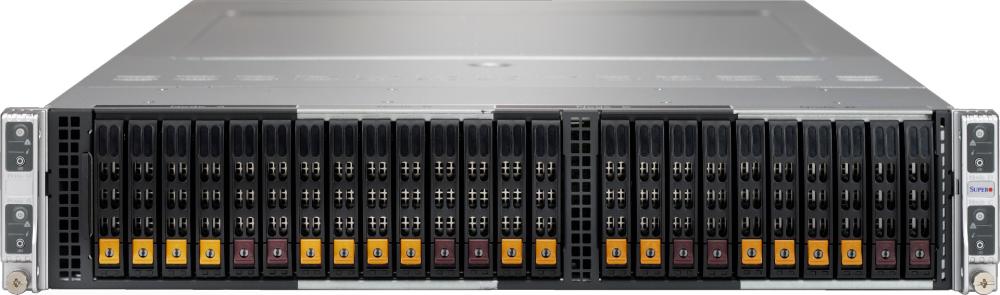
2U buys drive bays and PCIe slots. It matters when capacity per node has to grow later without adding hosts, or when the node needs more network adapters than a 1U chassis can hold — see 2U rackmount servers for the full range. The 2U four-node BigTwin AF-8 is the interesting hybrid case: four independent nodes in 2U with dual Xeon Gold, up to 768 GB memory and 15 TB raw per node, reaching a supported cluster size in a single chassis. Other multi-node options are in Supermicro BigTwin.
The multi-node chassis carries one caveat worth stating plainly: four nodes sharing a chassis also share a power and cooling domain. For clusters where the failure domain matters more than density, separate 1U hosts remain the safer design.
Compact nodes for edge sites

Where the deployment is a branch, a shop floor or a vehicle rather than a data hall, the SF-AF compact node exists for exactly that: a Xeon D processor, 128 GB of memory, 1 TB raw and enough network ports for a two-node edge configuration, powered by a DC adapter instead of redundant PSUs. It is not a small version of a data-centre node; it is a different tool.
Do not forget the network
On an all-flash or ESA cluster, vSAN traffic sits directly on the storage path. 10 GbE becomes the bottleneck long before the drives do, and no amount of NVMe fixes a saturated uplink. Plan for 25 GbE as the baseline on new all-flash builds, and check what the node actually ships with — several 1U ReadyNodes come with 10 GbE RJ45 by default. Switch options are in networking, including NVIDIA Ethernet switches.
If vSAN is not the answer
Licensing changes have pushed a number of European teams to re-evaluate, and it is a fair question to ask before committing to hardware. StarWind Virtual SAN runs two-node clusters economically and has a different licensing model; we build it on the same Supermicro platforms, for example the 2U Intel StarWind HCI node and the 1U AMD variant. The trade-offs are compared in StarWind Virtual SAN versus VMware vSAN, and the wider landscape in the best alternatives to VMware. If Microsoft is the direction, we also build Azure Stack HCI configurations.
Worth deciding before the purchase order, not after — the hardware for a two-node StarWind cluster and a six-node vSAN cluster look nothing alike.
What to send us for a vSAN ReadyNode recommendation
- Workload type — mixed VMs, databases, VDI, edge, backup, file services or general virtualization.
- Required usable capacity — the figure the applications actually need, not raw.
- Expected growth over the next three to five years.
- Failure-tolerance target — FTT=1 or FTT=2, and whether RAID-1, RAID-5 or RAID-6 is preferred.
- ESA or OSA preference, or tell us it is open and we will advise.
- Current VMware licensing situation.
- Available rack space and any depth or floor-loading limits.
- Network requirement or existing switch infrastructure.
- Delivery country and timeline.
- Form-factor preference — 1U, 2U, multi-node or compact edge.
How SERVER SIMPLY helps
SERVER SIMPLY helps European teams choose and source validated Supermicro vSAN ReadyNode configurations. We map your workload, usable-capacity target, storage policy, network requirements, rack constraints and delivery timeline to a supported configuration — then build and test it before it ships.
Instead of quoting raw terabytes, we estimate the real usable capacity after policy overhead, rebuild reserve and growth headroom, so the configuration matches the production requirement rather than the datasheet. You get a validated vSAN ReadyNode configuration, the storage policy it supports, the usable capacity it delivers, and a confirmed EU lead time.
Request a Supermicro vSAN ReadyNode configuration
Send us your workload, usable-capacity target, failure-tolerance requirement, rack-space limit and delivery country. SERVER SIMPLY returns a validated ReadyNode recommendation, supported storage policy, estimated usable capacity and confirmed EU lead time.
Request a configuration · Contact us · VMware vSAN solutions
Frequently asked questions
Which vSAN ReadyNode should I choose for mixed production VMs?
An all-flash AF-6 node is the usual answer, in 1U if you plan to scale out by adding hosts. Send us the usable capacity and failure-tolerance target and we will confirm the profile and node count against your workload before you order.
Should I choose AF-6 or AF-8 for VDI and databases?
AF-8. Those workloads are latency-sensitive and consolidation-heavy, which is exactly where the higher performance class earns its price. AF-6 can carry light VDI, but the margin disappears quickly as user counts grow.
Can SERVER SIMPLY calculate usable vSAN capacity before ordering?
Yes. Give us the target usable capacity, the failure-tolerance requirement and the intended cluster size, and we work backwards to the raw capacity and node count you actually need, including policy overhead, rebuild reserve and growth headroom.
Can SERVER SIMPLY help compare VMware vSAN and StarWind?
Yes. We build both on Supermicro platforms, so the comparison is like for like on hardware. For two-node clusters and for teams reassessing VMware licensing, StarWind is often the more economical route — we will show the difference in configuration and cost before you commit.
Can I request a validated Supermicro vSAN ReadyNode quote in Europe?
Yes. We configure, build and test in Estonia and deliver across the EU with confirmed lead times. Send the requirements listed above and you will receive a configuration with a binding delivery date.
Should I buy ESA ReadyNodes if I am not using ESA immediately?
If ESA is anywhere on the roadmap, yes. ESA needs an all-NVMe configuration on a validated ESA ReadyNode and cannot be retrofitted onto OSA hardware. The price difference now is far smaller than replacing the cluster later.
Does AF-8 mean a newer model than AF-6?
No. The number is a performance class, not a generation. An AF-8 node is validated for higher IOPS and capacity than an AF-6, but both may be current platforms and may even share a chassis family.
Can I mix profiles in one cluster?
Mixing is possible but rarely a good idea: vSAN distributes data across hosts, so the slowest node influences the cluster. Keep a cluster uniform and use separate clusters where the requirements genuinely differ.
Is a three-node cluster enough?
It is the technical minimum, not a comfortable one. With three hosts, a node in maintenance leaves nowhere to rebuild, so the cluster runs unprotected during routine patching. Four is a more honest floor, and six unlocks the most capacity-efficient ESA layout.
Do I need 25 GbE networking?
For all-flash and especially for ESA, yes. vSAN traffic sits on the storage path, and 10 GbE becomes the bottleneck long before the drives do. Check the network configuration as carefully as the drives — some 1U nodes ship with 10 GbE by default.
Related products and solutions
Comment(s)